
With Q4 underway and year-end payroll processing approaching, it’s important to understand how the SECURE 2.0 catch-up requirements will affect 401(k) contributions for Highly Paid Individuals (HPIs) in 2026.
The SECURE 2.0 law mandates that an employee who earned more than $150,000 in taxable social security wages in 2025 is considered a Highly Paid Individual (HPI) and must make all catch-up contributions as Roth. By the end of the year, HPIs may contribute a maximum of $24,500 as pre-tax contributions up to the standard limit, with the remainder as Roth contributions up to their catch-up limit.
401(k) contribution limits by age and HPI status
| Category | 2026 Base Limit | Maximum Possible Total Contribution (HPI or not HPI) | Maximum Possible Pre-tax Contribution If not HPI | Maximum Possible Pre-tax Contribution HPI |
| Deferral (Under age 50) | $24,500 | $24,500 | $24,500 | $24,500 |
| Catch-Up (Age 50 – 59 or 64+) | $8,000 | $32,500 | $32,500 | $24,500 |
| Optional Super Catch-Up (Age 60 – 63) | $11,250 | $35,750 | $35,750 | $24,500 |
How this requirement is handled in payroll
Insperity HRCore uses isolved functionality to automatically support the SECURE 2.0 Roth catch-up requirement. When 2025 W-2s are available in isolved, employees with more than $150,000 in prior-year Social Security taxable wages are automatically identified as highly paid individuals for 2026. Clients can also mark employees as HPIs using the Highly-paid Individual Override option on their Deferred Comp benefit record if they were not automatically identified.
When payroll is processed, the system automatically moves all catch-up retirement contributions to the 401(k) Roth HPI deduction for employees who are flagged as HPIs. This feature assumes all previous contributions up to the standard $24,500 limit were made as Pre-tax, so all remaining contributions should be Roth.
In practice, highly paid individuals may have elected both Roth and Pre-tax contributions throughout the year. If an HPI employee has already made Roth contributions before they reach the standard $24,500 limit, the automated functionality prevents them from maximizing pre-tax contributions.
Your Insperity Payroll service team can assist with workarounds to accommodate HPIs who need to attribute Roth contributions they made throughout the year as Roth catch-up so they can maximize their Pre-tax contributions.
Follow these steps to verify your retirement configuration for SECURE 2.0 HPI compliance:
What you need to do
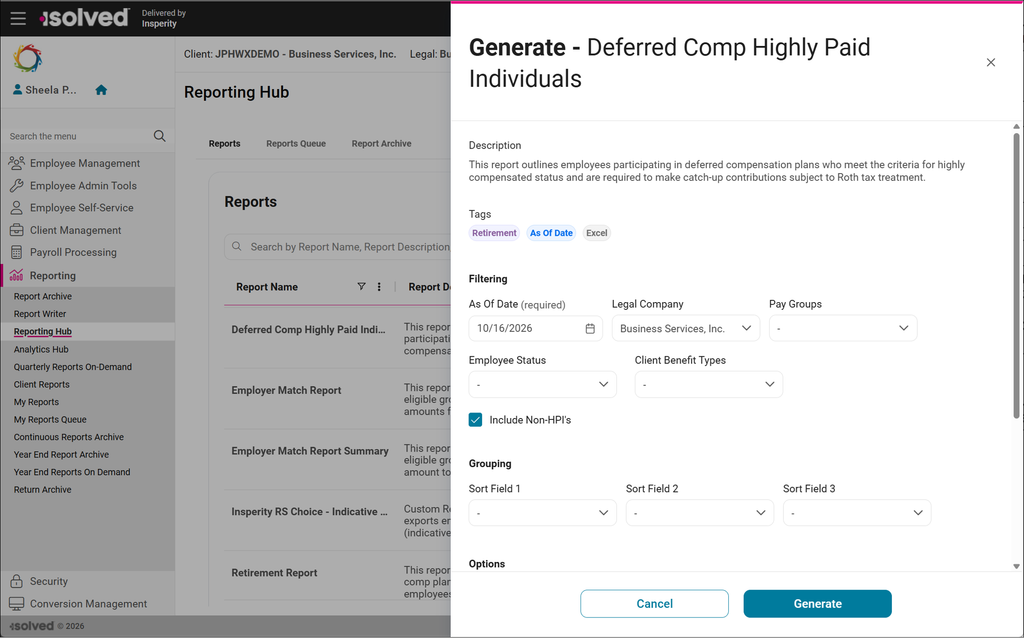
1. Run the Deferred Comp Highly Paid Individuals report in isolved to identify employees participating in deferred compensation plans who meet the criteria for HPI.
To run this report, go to the Reporting Hub and select All Reports. Search for Deferred Comp or Highly Paid to locate the report or filter your Tags to Retirement. If you don’t see the Deferred Comp Highly Paid Individuals report in your list, contact your Payroll Specialist to add it to your Standard Reports group. Check Include Non-HPI’s to list all employees.

2. Review the deferral rate elections for your HPI employees to identify anyone contributing to both pre-tax and Roth. Review employees who expect to maximize their pre-tax contributions and need to apply Roth contributions towards the catch-up requirement and limit.
Employee deferral rateelections can be found:
- On the employee’s Deferred Comp benefit record
- On the Retirement Report (Contr. values)
You can review year-to-date contribution amounts using:
- Employee Pay History YTD Amounts
- Retirement Report YTD Amounts
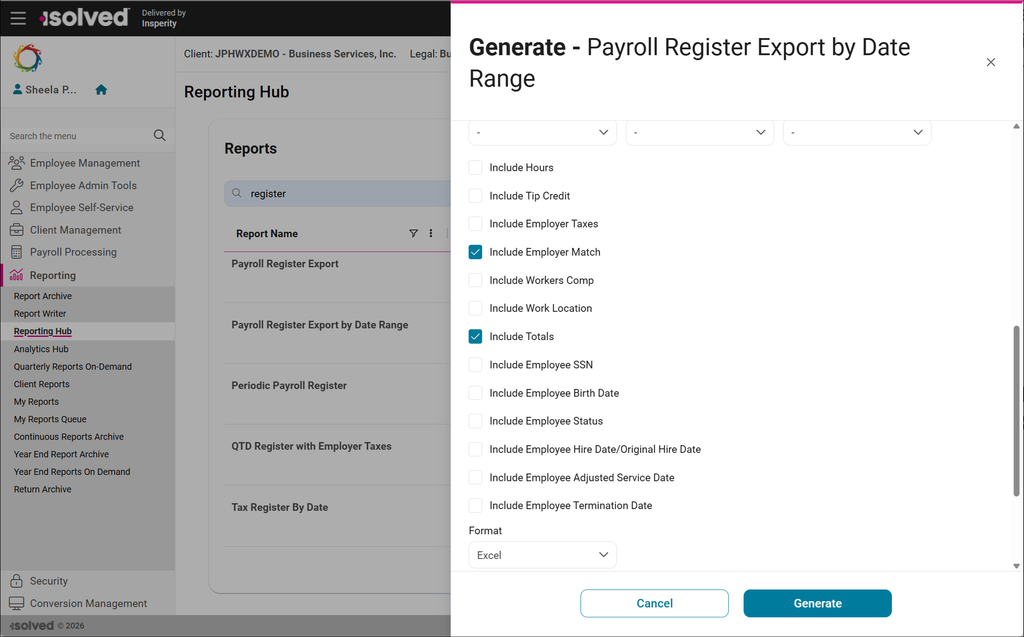
- Payroll Register Export by Date Range with YTD deduction columns
When running the Payroll Register Export by Date Range, be sure to select the Include Employer Match box at the bottom to include employer retirement contributions on the report.
3. Contact your Payroll Specialist if you identify an HPI who wants to continue making pre-tax contributions but is prevented from doing so because of the automated Roth treatment described above. Your Payroll Specialist can configure the necessary setup and walk you through the workaround to allow additional pre-tax contributions up to the standard contribution limit.
How to automatically maximize pre-tax contributions for 2027
To make this process easier next year, let your highly paid individuals know to elect Pre-tax contributions only in 2027. The system will automatically convert their contributions to Roth once they reach the 2027 IRS Section 402(g) standard limit to comply with the catch-up requirement.