
On Feb. 14, 2020, iSolved deployed a product release that included enhancements to iSolved Payroll and HR, as well as Benefits and iSolved Time.
Enhancements to iSolved Payroll and HR
Payroll run date reminders
Running your business is top priority, but make sure payroll doesn’t slip through the cracks. New email reminders can help by notifying your payroll processors when it’s time to run payroll. If you’d like to receive payroll reminders, contact your payroll specialist to get them set up.
Annual caps on employee garnishments
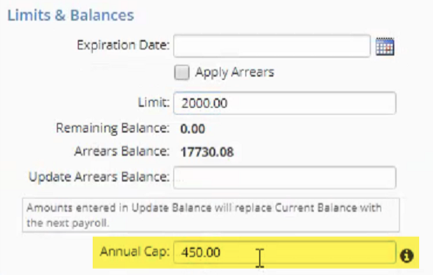
You can now assign an annual limit for each employee garnishment, which supports garnishment wage orders from courts and federal or state agencies The limit will cap the total amount that can be deducted in a calendar year. The new Annual Cap field is available in the Limits & Balances section of the Garnishments screen, which can be found on the Employee Management > Employee Pay menu in iSolved HCM.
Time entry grid changes to active employee filter
Changes to the active filter on the Time Entry Grid make it easier to pay only the employees who were active during the pay period.
- If employees are hired after the pay period end date, they will no longer be included.
- If employees are terminated after the pay period end date, but were active on at least one day in the pay period, they will be included. These terminated employees are highlighted on the grid with a red flag.

Hide employee labor fields in Quick Hire
Labor fields in iSolved are used to:
- Capture where an employee is working or task they are performing during time entry for accurate labor allocation
- Determine the correct pay rate for employees
- Define general ledger account numbers so they can be associated with earnings, deductions, memos and taxes on your general ledger reports
- Capture additional details like the date when an employee worked for certified payroll reporting
Depending on the purpose of your labor fields, you may want to assign a home or default value to employees when you hire them. iSolved has always included or required employee labor field assignments for the New Hire and Quick Hire wizards. To ease confusion and streamline the process, you can now hide labor fields from the Quick Hire screen if you don’t need to assign a default value to employees.
Search for reports in Report Writer
A new search option on the Report Writer screen lets you quickly find the one you need.
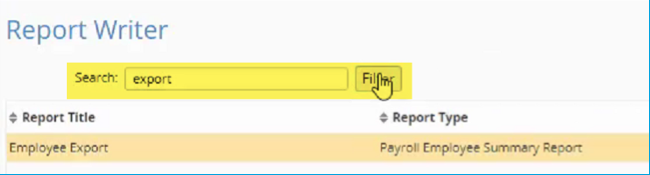
Garnishment, Time Entry Grid and Report Writer changes were applied automatically. To take advantage of payroll run date reminders or to hide labor fields in Quick Hire, you will need to contact your payroll specialist.
Enhancements to iSolved Benefits
Benefit enrollment enhancements
As part of the ongoing focus on usability in iSolved Employee Self-Service (ESS), benefit enrollment has been enhanced.
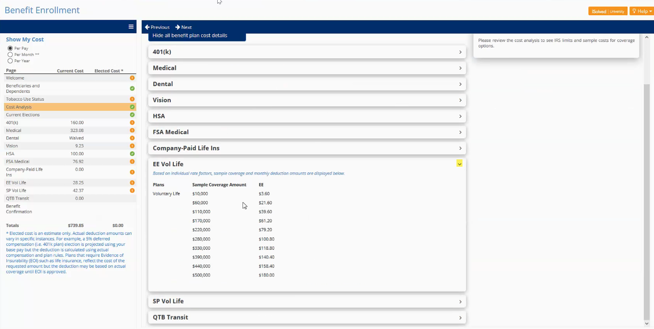
At the beginning of the enrollment wizard, the Cost Analysis page lets employees expand and collapse benefit types, allowing more details to be shown for each plan.
Messages can now be included on all the pages in the enrollment wizard. You can provide more details and better instructions to employees. Multiple web links and downloadable documents allow employees to collapse message boxes and focus on one section at a time. Documents that require employee review must now be opened or downloaded to sign the acknowledgment.
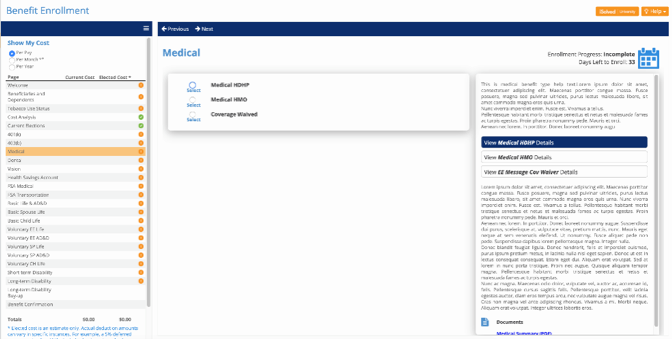
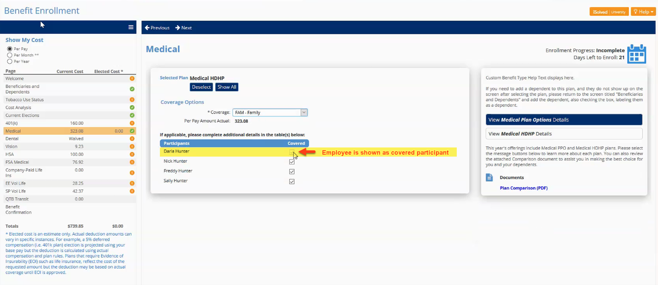
When employees are enrolled in a benefit plan, they will now be shown as participants in the coverage section.
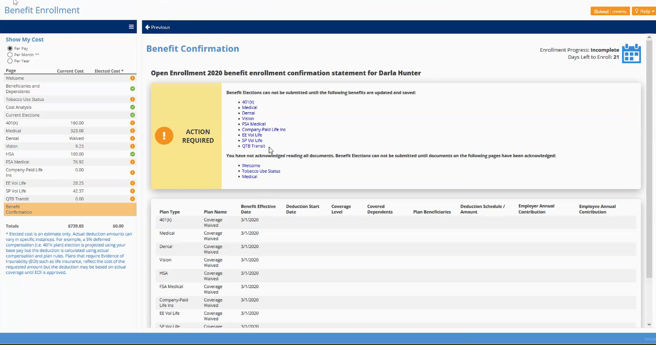
If employees have skipped sections or missed acknowledging important documents during enrollment, the improved Benefit Confirmation screen lists items they still need to review and clickable links navigate directly to that page.
The benefit navigation enhancements were applied automatically to your new hire, life event and open enrollments. To add new messages on your benefit pages, you will need to contact your benefits specialist.
Enhancements to iSolved Time
Overtime labor options
iSolved Time has always been able to convert hours to overtime based on daily or weekly requirements. The enhanced overtime options allow you to designate which hours become overtime first, based on employee labor assignments. You can now assign overtime first to:
- Time when employees are working in their home labor assignments
- Time when employees are working outside their home labor assignments
- Time when employees are working in specific labor assignments
These options help you allocate overtime for more accurate cost reporting.
Prevent verification of locked timecards
Locking timecards is the first step to paying employees for time recorded in iSolved Time. Previously, employees, supervisors or managers could approve timecards after they had been locked. Now you can lock down any changes to the timecards, including changes to verification status.
Automating California split shift premium pay
If you are subject to California labor requirements and have employees who work a split shift, you can now automate the one-hour premium pay in iSolved Time. A split shift occurs when an employee works for part of the day, leaves for longer than a meal period, then returns later to work again. For example, a restaurant server who works from 10 a.m.-1:30 p.m. and returns at 4 p.m. to work would be subject to the split shift premium if they are paid minimum wage. The shift split premium is one hour at the California state minimum wage OR the local minimum wage, whichever is greater.
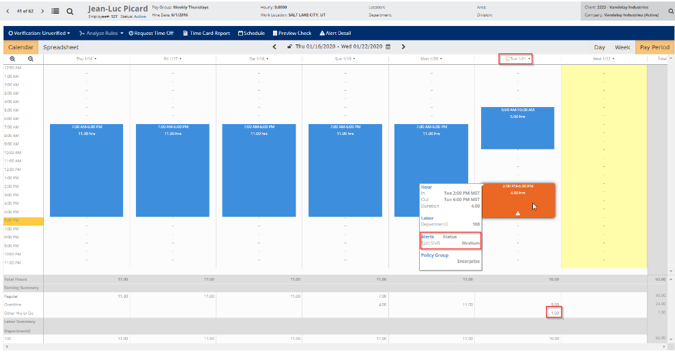
With this feature, split shifts are identified on the employee timecard as an alert. The alert color will be defined by the alert level you choose.
If you would like to enable these new iSolved Time features, please contact WATime@insperity.com.