
You can now allow your employees to opt in for electronic delivery of year-end tax forms in iSolved. These include W-2s, 1099s and 1095s (if using iSolved for ACA Compliance). Once you have activated this feature, iSolved can capture employee’s electronic signatures of acceptance through Employee Self Service. By doing so, employees will consent to receive their year-end forms electronically, and a paper copy will not be included with any year-end forms you receive.
How to set up electronic delivery
If you would like to offer this option to your employees, you will need to follow the steps below.
-
- Contact your assigned payroll specialist and ask them to activate this feature.
- Confirm you received notification from your payroll specialist stating that the activation was successful.
- If you choose to do so, you may send out communication to your employees to make them aware of this option and encourage them to log in to Employee Self Service to complete their electronic consent. We’ve prepared a sample email communication to use when notifying employees:
Electronic delivery of year-end tax forms is now available
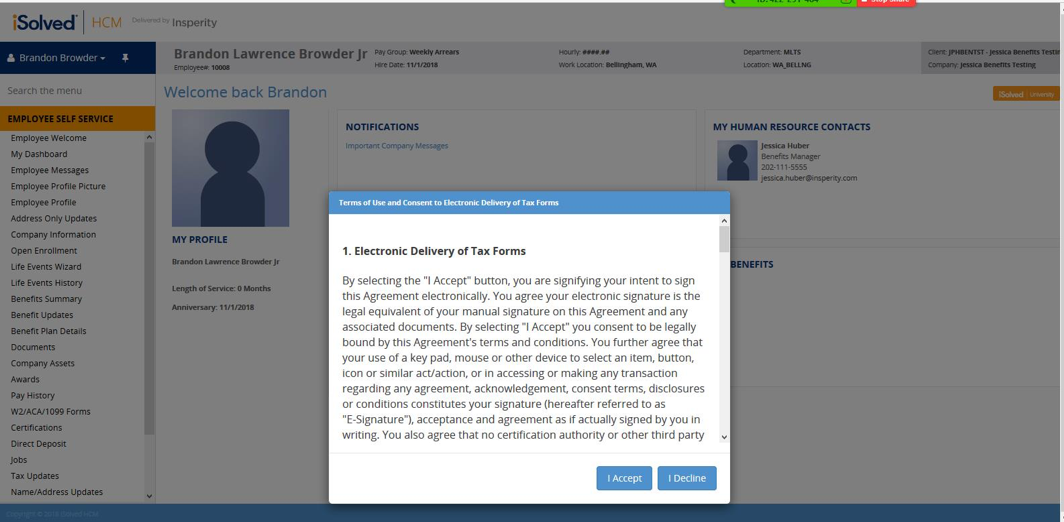
The next time you log in to iSolved Employee Self Service, you will have a pop-up notification giving you the option to complete electronic consent to receive electronic delivery of year-end tax forms, as well as the option to decline.
Please log in to Employee Self Service before Dec. 31, 2018, if you would like to elect electronic delivery of year-end forms.
Below is an example of the request your employees will see upon logging into iSolved.
NOTE: If you do not wish to set this feature up for your company, you can disregard. No action is required.
Keep in mind that electronic year-end tax forms will be available through Employee Self Service in iSolved on Jan. 31, 2019.