The U.S. Citizenship and Immigration Services published a revised Form I-9, Employment Eligibility Verification, on Aug 1, 2023. Now that the final version has been published, development can begin to update the electronic version in onboarding, ESS, and isolved People Cloud. Insperity will notify you in the release notes in the Insperity® Help Center when the updated I-9 form is available. Employers may continue using the current Form I-9 through Oct 31, 2023. Beginning Nov 1, only the revised form will be accepted.
The EEOC announced that the submission of EEO-1 data for 2022 will begin in mid-July. Updates regarding the 2022 EEO-1 Component 1 data collection, including the opening date, will be posted to EEOCdata.org/eeo1 as they become available.
Who needs to file EEO-1 reports each year?
Companies with 100 or more employees
Companies with fewer than 100 employees or if the company is owned by or corporately affiliated with another company and the entire enterprise employs a total of 100 or more employees
Federal government prime contractors or first-tier subcontractors subject to Executive Order 11246 with 50 or more employees and a prime contractor first-tier subcontract amounting to $50,000 or more
What information will be needed to file?
Company ID and unique PIN
Company EIN and NAICS code and company DUNS number (if a federal contractor)
Establishment address, EIN and NAICS code for each establishment or establishment DUNS number (if a federal contractor)
Count of all full- and part-time employees on the effective date selected by the employer
Gender and race/ethnicity of all employees
EEO-1 job categories of all employees
Get your data ready
Requirement one: All jobs must have an EEO Category assigned
Navigate to Client Management > Job > Jobs and ensure the EEO Category is populated for all your jobs in isolved. Don’t forget to check any jobs that may be inactive as well. If the job was active in the prior calendar year, it will need to have an EEO Category assigned as well.
Requirements two and three: All employees must have a gender and ethnic origin assigned
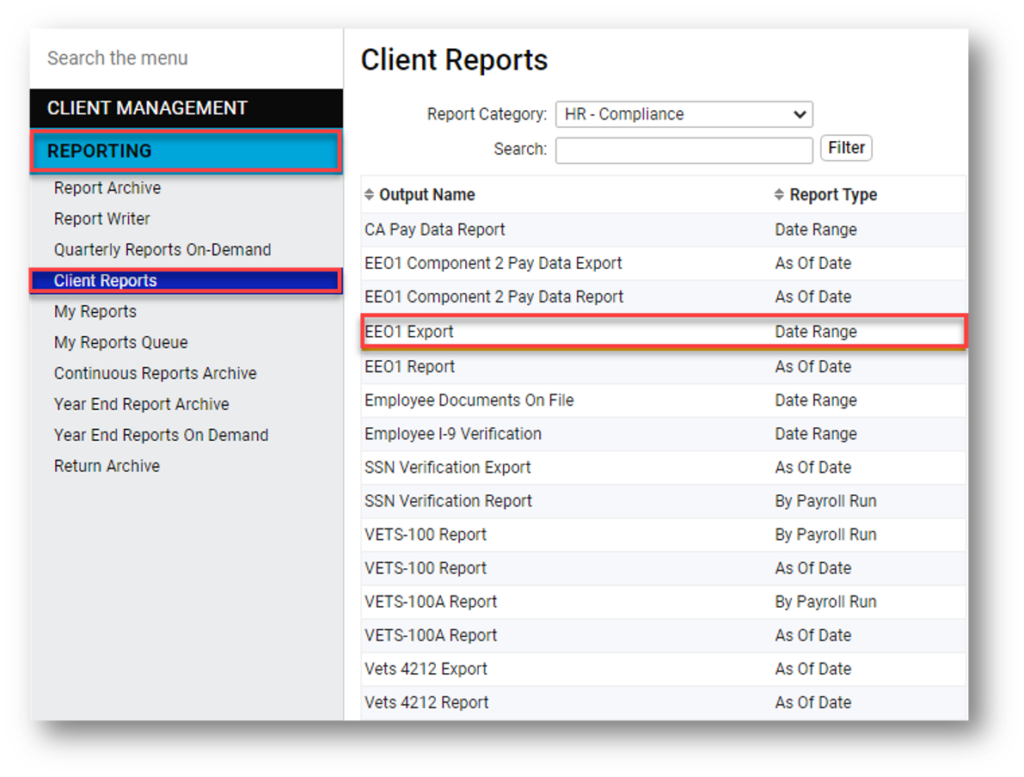
An easy way to identify where updates are needed is to run the EEO-1 report. Navigate to Reporting > Client Reports and select a Report Category of HR – Compliance to filter your report list. Select the EEO1 Report – As Of Date and enter the following report criteria:
As Of Date: Enter the period end date for the payroll you select to use for EEO reporting. This pay period must fall between Oct. 1 and Dec. 31 of the 2022 reporting year.
Date Type: Select Period Ending Date
Employees To Include: Keep the default ALL Active and Inactive employees
Select the Employee Audit Report (Excel format)
When viewing the report, page down and you will see a list of errors that need correction:
All employees must be assigned an EEO job category
All employees must have a gender and ethnic origin
Update your data
Ask your employees to add missing gender or ethnic origin data through employee self-service.
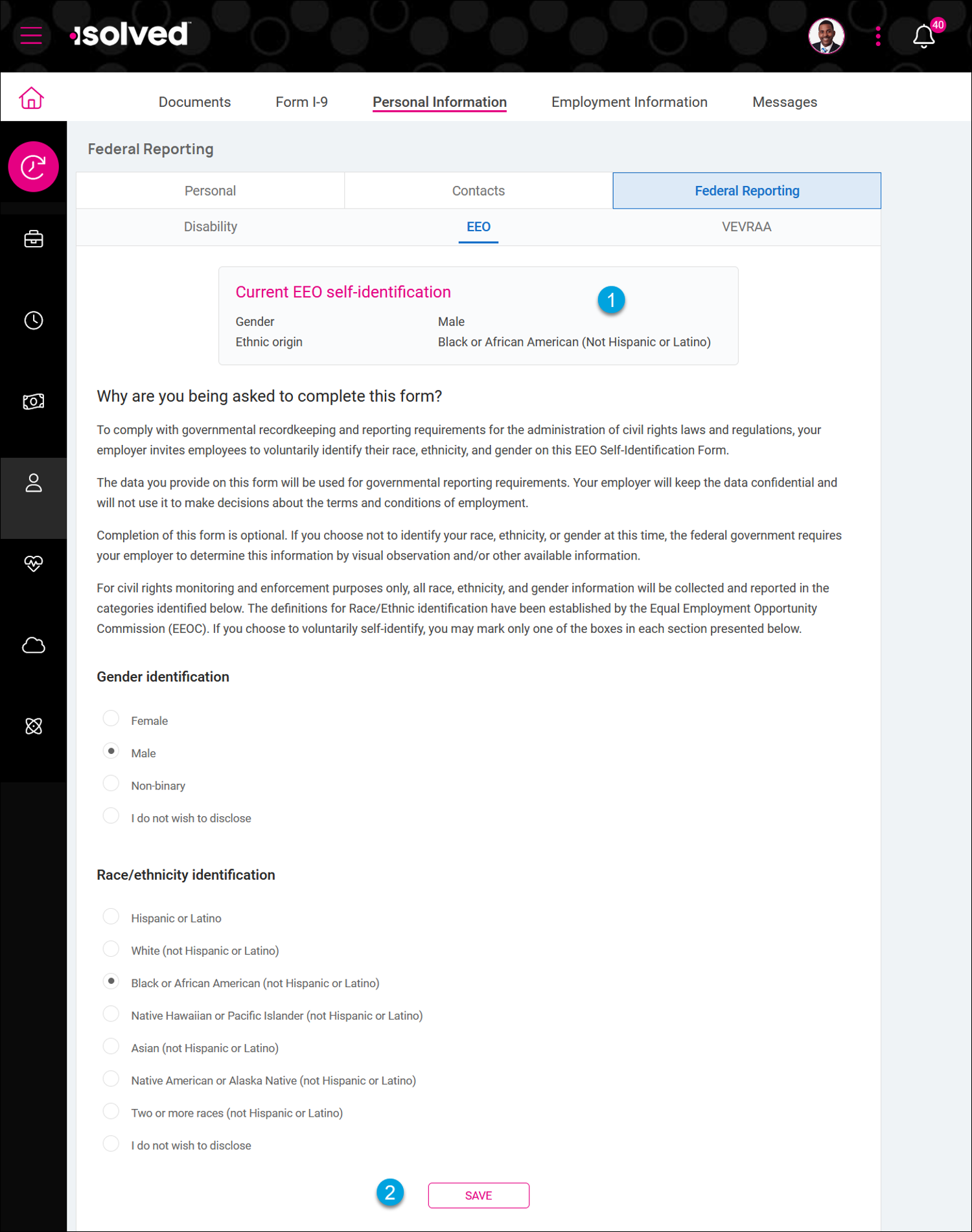
For clients using the modern Adaptive Employee Experience (AEX), employees will navigate to Personal > Personal Information > Federal Reporting > EEO to update their gender and race/ethnicity identification selections. They will be able to see their current self-reported status and make updates on any device: phones, tablets or computers.
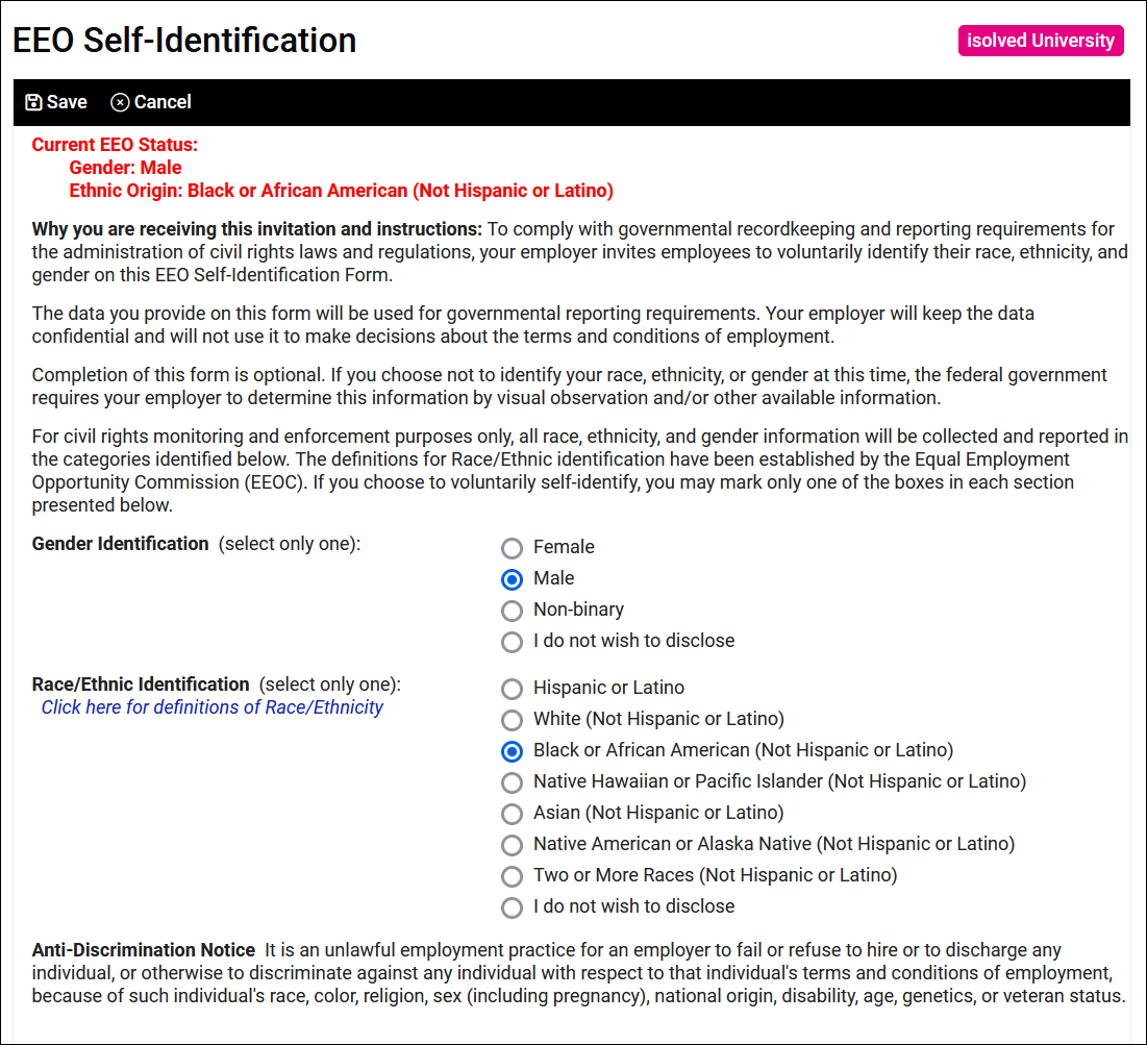
For clients using Employee Self-Service in Classic View, employees will navigate to Employee Self-Service > Federal Reporting Data > EEO Self-Identification to update their gender and race/ethnicity identification selections.
Please note: If an employee is not comfortable answering the questions, they can select the option “I do not wish to disclose,” but the field cannot be left blank.
If your employees do not have access to make these updates, contact your payroll specialist and they can enable the appropriate security roles.
Ensure all work locations are tied to an establishment
Establishments screen links work locations to EEO-1 reporting establishments.
Navigate to Client Management > Client Maintenance > Establishments and ensure all your work locations are tied to an establishment in isolved. If you already have an establishment created, verify all your work locations are associated with the establishment. If you need to create an establishment, click the Add New button to create your establishment and then select your work locations that you want to tie to your establishment.
To use the isolved EEO1 Report or EEO1 Export, you need to link your work locations to EEO establishments and assign your company headquarters on the Establishments screen for accurate reporting.
If you are a multi-establishment employer, make sure you designate one of your establishments as your headquarters to enable the Type 3 Headquarters report.
Run your EEO-1 Audit Report
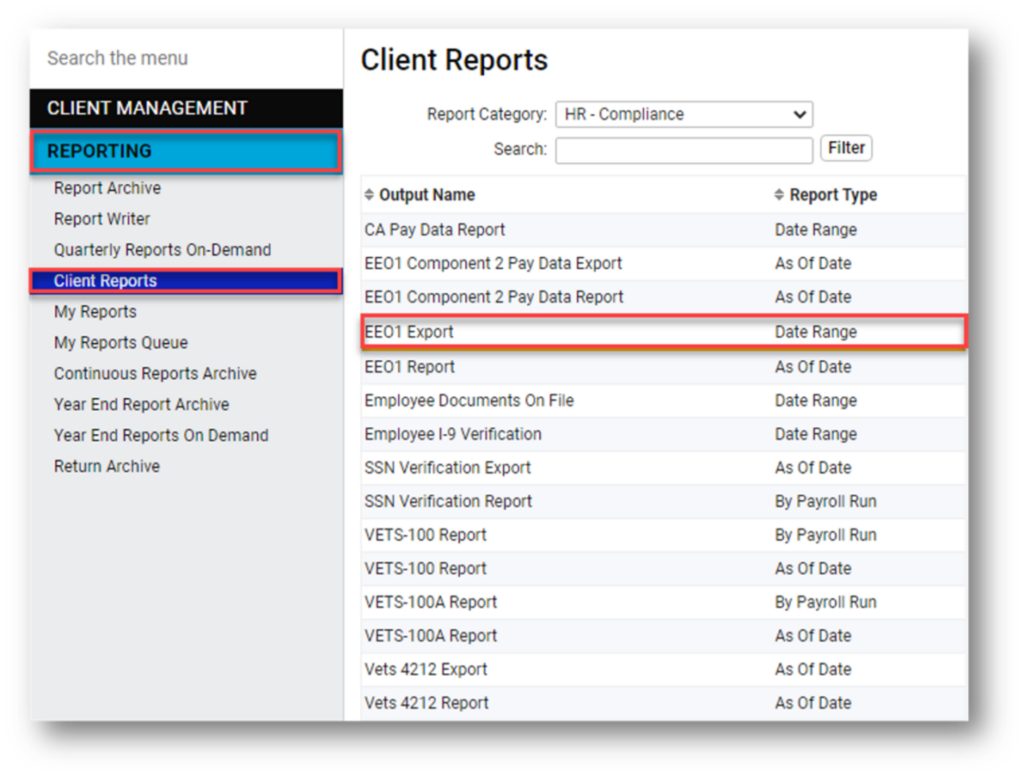
Run your EEO1 Employee Audit Report again to verify all your data has been updated. Look good? Now you are ready to run your EEO1 Export report. Navigate to Reporting > Client Reports and select the Report Category HR – Compliance to easily access the EEO-1 reports in isolved and submit your data through the EEO-1 Data Collection Portal.
For companies tracking ethnic origin, gender and EEO classifications in isolved, the EEO1 Export is formatted as a comma-delimited (CSV) file for upload to the EEO-1 Component 1 Online Filing System. This report is available on the Reports > Client Reports menu in the HR Compliance Reports category.
U.S. Immigration and Customs Enforcement (ICE) announced that employers have until Aug. 30, 2023, to bring I-9s into full compliance after the July 31 sunset of the COVID-19 flexibilities policy. The sunset of this policy will reinstate the requirement that employers complete in-person I-9 physical document inspections for employees whose documents were inspected remotely during the flexible period. This also means that any new employees hired on or after Aug. 1 of this year must have their I-9 documents physically inspected, regardless of the company’s remote work status.
Employers have been exempt from the physical inspection requirement since March 2020. However, employers who have already initiated the return of their employees to in-person work are required to immediately physically inspect all employees’ I-9 documents if those employees onboarded remotely on or after April 1, 2021; this requirement applies to all employees, even if only a portion of the employee population returned to in-person work.
Recommendations for employers going forward:
Bring all I-9s previously out of compliance into compliance with physical inspections prior to Aug. 30, 2023.
Compliance with the new policy can be evidenced by annotating the “Additional Information” box located in Section 2 of the form.
Examples of how to annotate the Section 2 box are available here.
By Aug. 1, employers must inspect physical documents for all employees regardless of their remote work status.
Simultaneous to ICE’s recent action, the Department of Homeland Security (DHS) proposed a rule that would make in-person physical inspection of I-9 documentation optional under certain circumstances. DHS has stated that it could issue a more formal Notice of Proposed Rulemaking as soon as one year after the end of the comment period for the initial proposal. Employers should lookout for updates to this process beyond those issued by ICE in the coming months.
The Biden Administration announced its intent to end the COVID-19 Public Health Emergency (PHE) and National Emergency (NE) periods on May 11, 2023. These declarations have been in place since 2020 to provide flexibility and access to critical COVID-19 countermeasures, tests, vaccines and treatments.
What changes are expected to occur once the national emergencies end?
Various employee benefit plan deadlines were extended due to an “outbreak period” from March 1, 2020, until 60 days after the announced end of the national emergency. Since the national emergency ends on May 11, 2023, the outbreak period will end on July 10, 2023. Once the outbreak period ends, health plans can return to their nonextended deadlines.
Ending the emergency declarations will impact plans in the following ways:
Group health plans are no longer required to cover COVID-19 diagnostic testing (including over-the-counter tests) at no cost to individuals.
Group health plans are still required to cover recommended preventive services, including COVID-19 immunizations, without cost sharing, but this coverage requirement is limited to in-network providers.
The extensions of certain time frames for employee benefit plans are expected to end on July 10, 2023 (60 days after the end of the national emergency). Several timeframes were extended for many plans to give individuals more time to act. Extensions such as:
HIPAA special enrollment
Electing COBRA continuation coverage
Paying COBRA premiums
Submitting health claims and appeals
Plan sponsors should review and consider the following actions:
ACTION ITEMS
HEALTH & WELFARE PLANS
Collaborate with third-party administrators (e.g., COBRA administration) to develop a communication plan around extended timelines to participants
Review and update Plan Documents and Summary Plan Documents to ensure extended timelines are addressed
Communicate to participants on how previous extended timelines will be managed
This change results in a three-month delay from the previous tentative opening date of April 2023.
Updates regarding the 2022 EEO-1 Component 1 data collection, including the opening date, will be posted to EEOCdata.org/eeo1 as they become available.
California pay data reporting
California enacted legislation in 2020 requiring pay data reporting obligations for certain employers. In 2022, California expanded the legislation to require reporting of median and mean pay information.
The portal for submitting reports to the California Civil Rights Department (CRD) is now open and can be found on the Pay Data Reporting Portal. The deadline for submitting reports is May 10, 2023.
Illinois pay data reporting is in effect
Illinois joined California as the only other state that requires employers to collect and submit employee pay data to the state. Pay data reporting began Jan. 1, 2023 and employers must obtain an equal pay registration certificate by March 24, 2024. Information about obtaining a certificate can be found on the Illinois Department of Labor website.
Running reports in isolved
For companies that have been tracking ethnic origin, gender and EEO classifications in isolved, the EEO1 Export is formatted as a comma-delimited (csv) file for upload to the EEO-1 Component 1 Online Filing System. This report is available on the Reports > Client Reports menu in the HR Compliance Reports category.
Establishments screen links work locations to EEO-1 reporting establishments
To use the isolved EEO1 Report or EEO1 Export, you need to link your work locations to EEO establishments and assign your company headquarters on the Establishments screen for accurate reporting.
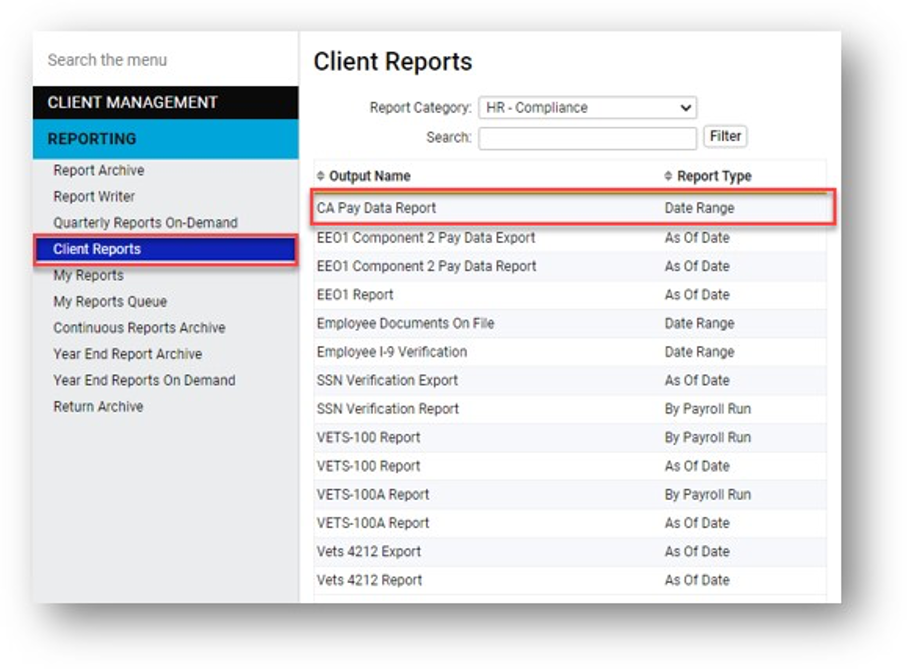
California employers can use the CA Pay Data Report that is found under Reporting > Client Reports menu in the HR Compliance Reports category.
As technology continues to evolve, so does the use of our biometric data. Biometric data includes, but is not limited to, the usage of fingerprints, facial recognition and iris scans. This can also include the use of fingerprint and/or facial recognition while accessing smartphones and tablets.
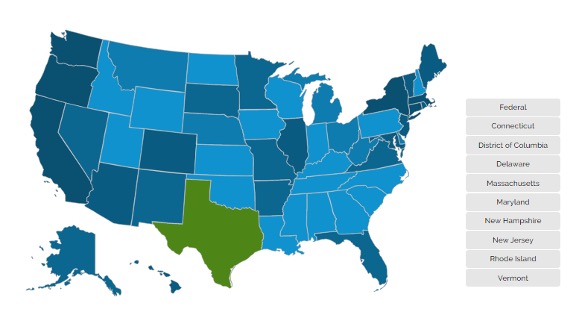
Illinois, Maryland, Texas, New York and Washington are all states that have existing regulations in place regarding the use of biometric privacy, which can include time clocks. If you have employees in any of the states mentioned above or would like to learn more about best practices regarding biometric privacy, check out the resources available on our HR Support Center:
The HR Support Center is intended for clients using Insperity’s Workforce Acceleration™ or Workforce Administration™ product offering. Customers of Insperity’s Workforce Optimization® solution should reach out to their Insperity HR specialist for guidance.
In 2023, nearly half of the country will see increased minimum wage requirements. Employers in several states must be aware that the minimum wage is rising across the country. Our HR Resource Center will help you through the changes that may affect your company:
Make sure you have updated your employees in isolved with the applicable minimum rates and salaries for 2023. Use the How do I find employees who are being paid below minimum wage? guide in the Insperity Help Center to identify employees who are paid below minimum wage, specifically when a location’s minimum wage is changed.
Key points to remember
Minimum wage rates are based on your employees’ work location, not employer location.
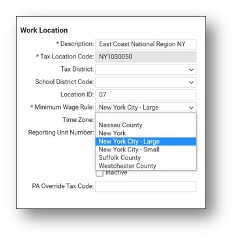
Although minimum wage rates are based on an employee’s work location, they can sometimes vary by jurisdiction, employer size and/or industry. As such, your employees’ work locations have been configured based on your company’s specific business requirements.
To see accurate minimum wages listed on the Employee Salary/Hourly Rate List dashboard in isolved People Cloud, confirm your employees are assigned to the correct default work location on their General screen in Employee Maintenance.
If you need to update the applicable minimum wage or your work locations, contact your Insperity payroll specialist.
Where federal, state and local minimum wage apply, the Fair Labor Standards Act (FLSA) requires an employer to pay at the highest applicable hourly rate (e.g., if the employee works in San Jose, California, the employee should be paid at $17/hour on Jan. 1, rather than at the state wage of $15.50 or the federal wage of $7.25).
Insperity is here to help
If you have any questions or concerns about how this minimum wage change will impact your business, please contact your Insperity payroll specialist.
As stated in the Client Service Agreement (CSA), compliance with the FLSA and any similar state law is the client’s responsibility. By providing the information and suggestions contained in this communication, Insperity is not assuming any liability or responsibility for FLSA compliance and is not intending to amend or alter in any way the terms of the CSA.
New legislation in Illinois, effective Jan. 1, 2023, gives employees the right to a day of rest every workweek, along with meal and rest breaks during daily work shifts.
Employers will have to provide nonexempt employees with at least 24 consecutive hours off of work in each consecutive seven-day period instead of each calendar week. There are exemptions, including for supervisors and employees who work 20 hours or less per week. Exception permits can be obtained from the Illinois Department of Labor for employees to work on the seventh day if the employee agrees on a voluntary basis.
Employees who work more than 7.5 hours in a row will be entitled to an additional 20-minute meal break for every 4.5 hours worked.
Employers must post a notice about these rights in a conspicuous location at work. For employees who don’t regularly report to the workplace, employers must provide the notice by email or on an internal website that the employer regularly uses to communicate work-related information. This should be something that all employees can regularly access.
Insperity Workforce Acceleration can help
Insperity® Workforce Acceleration™ technology makes it easy. You can share the required information with your Illinois employees:
As an announcement on the Company Messages page Employees automatically receive notifications in the Adaptive Employee Experience (AEX) or ESS Classic View when you post new announcements. You can use eligibility rules so just Illinois employees can view the announcement or receive the notification. Employees using ESS Classic View on desktops can view the announcement on the Company Information page.
Employee Messages page Employees automatically receive notifications in the Adaptive Employee Experience (AEX) or ESS Classic View when you post new messages. You can use eligibility rules to limit access to the message and just send notifications to your Illinois employees.
Mass Email feature Employees will receive the email message at the address they used to register for self-service. You can use eligibility rules to send emails to just your Illinois employees. You can easily view the send status and resend emails from the Self-Service Management dashboard.
allow you to include short messages that will be printed on employee check stubs and online pay vouchers. While the full text is too long for the paystub, you can include a short reminder directing employees to view the notice.
For assistance configuring message templates, email templates or paystub notifications, contact your Insperity payroll specialist.
More information on ODRISA, including exemption permits, can be found on the Illinois Department of Labor website.
As stated in the Client Service Agreement (CSA), compliance with the FLSA and any similar state law is the client’s responsibility. By providing the information and suggestions contained in this communication, Insperity is not assuming any liability or responsibility for FLSA or state compliance and is not intending to amend or alter in any way the terms of the CSA.
For employers doing business in Oregon, Paid Leave Oregon is a 2023 program that ensures access to paid leave for family or medical leave, or to address a domestic violence situation. Information can be found on the Insperity Help Center, Paid Leave Oregon and the state website State of Oregon Paid Leave Oregon.
Unlike other states with mandatory paid family and medical leave programs, effective Jan. 1, 2023, New Hampshire allows employers and employees to opt into a voluntary state-paid family and medical leave plan under the Granite State Family Leave Plan program. For more information, visit New Hampshire Paid Family and Medical Leave.
On Jan. 5, the Federal Trade Commission (FTC) proposed a rule to prohibit employers from using noncompetition agreements. According to the FTC, the proposed rule would:
Make it illegal for an employer to have a noncompete with a worker.
Require employers to rescind existing noncompetes and actively inform workers that they are no longer in effect.
Apply to independent contractors, unpaid interns and anyone who works for an employer – whether paid or unpaid.
Generally, not apply to other types of employment restrictions, like non-disclosure agreements. However, other types of employment restrictions could be subject to the rule if they are so broad in scope that they function as noncompetes.
You can review the proposed rule here and submit a public comment by following the instructions in the proposed rule. The comment period is open through March 10, 2023.
Keep in mind that this is a proposed rule, so we don’t know if or when it will be adopted and, if so, whether the adopted rule will differ from the proposed rule. While we track whether noncompete agreements are limited or prohibited federally and at the state level, we can’t otherwise advise on using, drafting, or enforcing noncompetes.
If you’re interested in using noncompete agreements with employees, you should consult with an employment attorney who practices in your state.