The following Client Reports have been added to allow the export of MyCOSavings data from isolved:
CO Retirement Savings – Contributions FTP
CO Retirement Savings – Initial Census
CO Retirement Savings – Ongoing Census FTP
These reports will provide you with the employee information you need to provide the state as part of the registration process (CO Retirement Savings – Initial Census) as well as the ongoing requirement to provide employee information (CO Retirement Savings – Ongoing Census FTP). CO Retirement Savings – Contributions FTP will export MyCOSavings deduction information from isolved. Please visit Colorado Secure Savings website for additional information on the plan.
At the end of each quarter, we ask that you review important payroll and tax information in isolved for accuracy.
All Q1 2023 payroll and tax information must be accurate and complete in isolved by Friday, March 31, 2023 to ensure timely filing. Below are the recommended items to review to help you meet all requirements successfully.
Review tax setup information
It is crucial to confirm that your company and tax setup is correct in isolved. Review each piece of information shown below by going to Reporting > Client Reports to run each report.
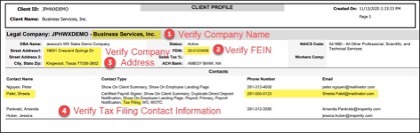
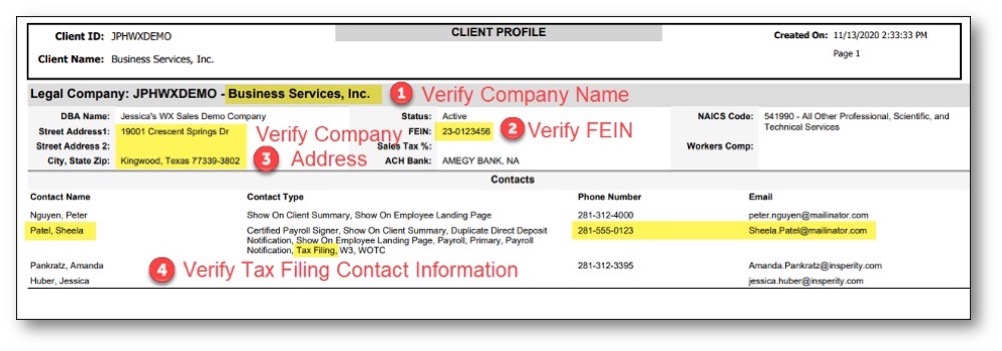
Validate the company information below on the Client Profile Report.
Name matches the legal company name registered with tax agencies.
FEIN matches the legal FEIN registered with tax agencies.
Address matches the legal company address registered with tax agencies.
Verify that a Tax Filing contact is listed and that their contact information (name, email address and phone number) is correct and as it should be reflected on tax forms.
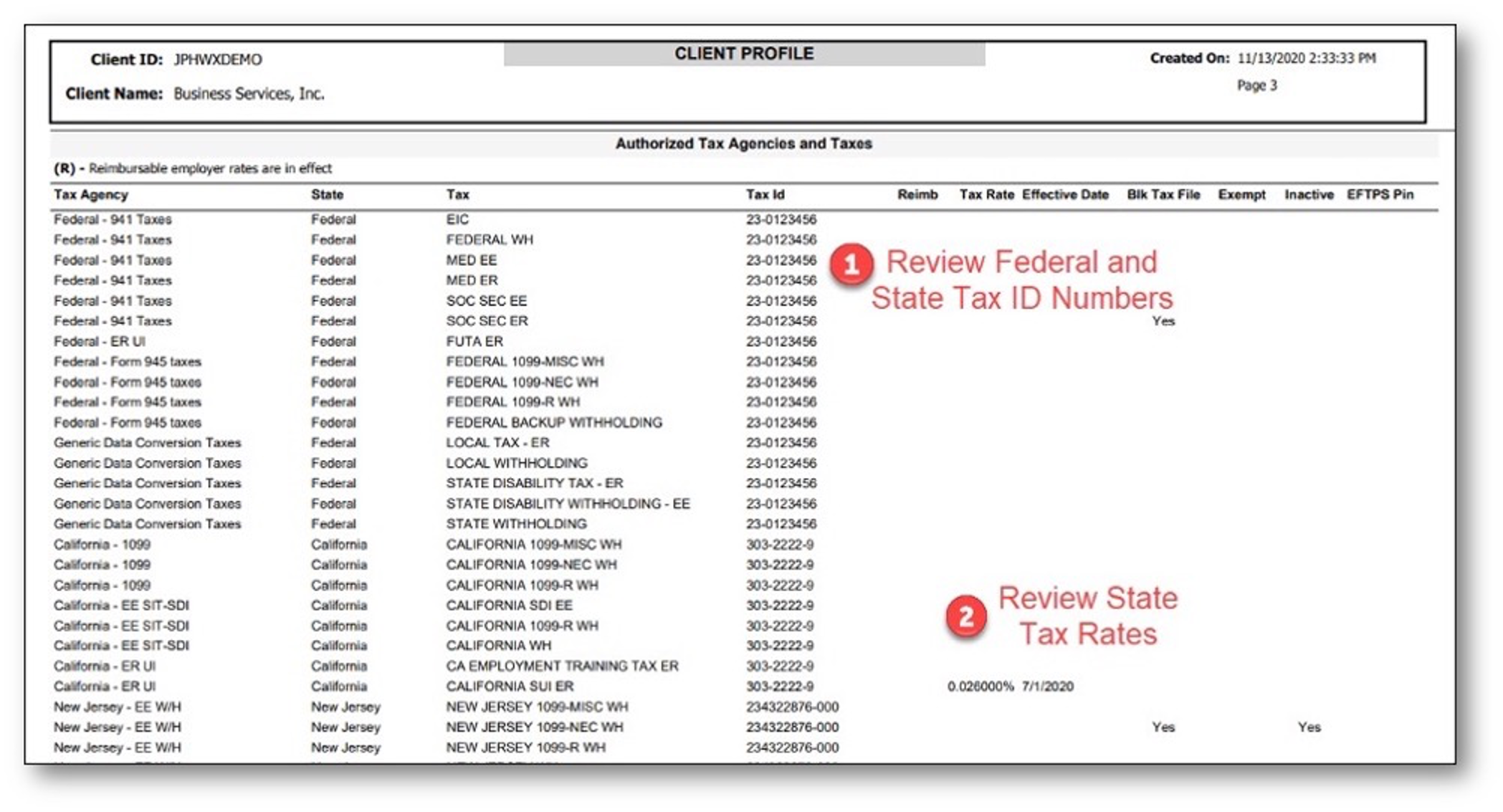
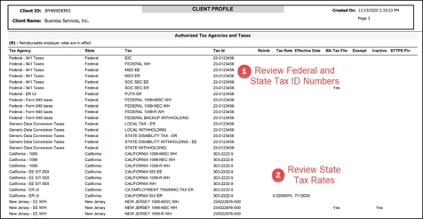
Validate your company tax information on the Client Profile Report under the Authorized Tax Agencies and Taxes section.
Review the federal and state tax ID numbers for accuracy.
Review the state filing frequencies and rates to ensure they are correct.
NOTE: Please remember tax agencies do NOT send any rate or filing frequency notices to Insperity, but they do send this information to you, the employer of record. If you have received these notices or see any discrepancies in your isolved setup, please forward all information to your payroll specialist.
You must have a registered ID number with all appropriate state and federal agencies in order to file. Agencies do not accept “Applied For” ID numbers for filing and payments. Submitting your filings with an “Applied For” ID could cause delay and agency penalties and fees.
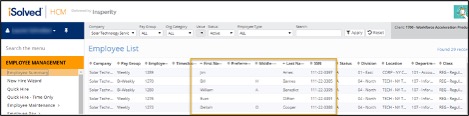
Review employee information on the Employee W2 Verification Report.
Verify employee names and social security numbers for accuracy.
Other important tax reminders
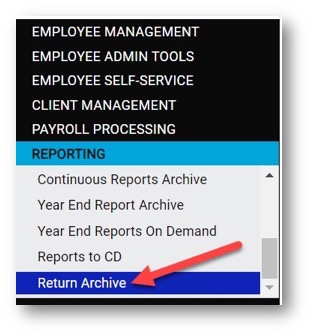
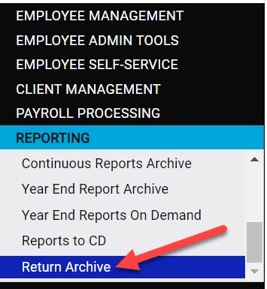
First-quarter tax filings will be available on the Return Archive page of the Reporting menu in isolved on May 2, 2023.
Pay items that have not been entered in isolved yet, OR payroll adjustments that will be reflected on Q1 2023 returns, MUST be reported to your payroll specialist by Friday, March 31. These items include:
In-house checks
Voided checks
Tax adjustments
Third-party sick/disability payments
Ensure all FFCRA qualified sick and leave wages are entered correctly.
An additional charge will be applied for any Q1 2023 corrections submitted after the deadline of Friday, March 31, 2023.
Please contact your dedicated payroll specialist today if you have any questions or concerns regarding the information above.
In accordance with your agreement and Form 8655 (Reporting Agent Authorization), this notification serves as confirmation that your third-quarter 2022 payroll tax returns and payments have been filed on your behalf by Insperity® Payroll Services.
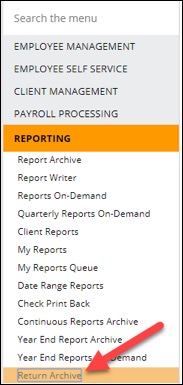
Third-quarter report packages were made available in isolved on Nov. 1 and include all tax returns that were filed by Insperity. To access your quarterly report packages, log in to isolved and navigate to Return Archive under the Reporting menu.
You can filter the list of available report packages by using the drop-down menus at the top of the screen, shown below.
Ongoing tax communication
As a reminder, send all payroll-related tax communication you receive to your Insperity payroll specialist for review. Insperity does not receive direct communication regarding your tax accounts from state and federal agencies. These notices may contain important tax information needed for correct and timely tax payments and filings. Incorrect or missing information may result in penalties and interest assessed by the tax agency. Insperity is not responsible for any penalties and interest charged.
As the end of the quarter approaches, we ask that you take some time to review important payroll and tax information in isolved.
All Q3 payroll and tax information must be accurate and complete in isolved by Friday, Sept. 30, 2022, to ensure timely filing. Below are the recommended items to review to help you meet all requirements.
Review tax setup information
It is important you confirm that your company and tax setup is correct in isolved. Go to Reporting > Client Reports to run each report.
Validate the company information below on the Client Profile Report.
Name matches the legal company name registered with tax agencies
FEIN matches the legal FEIN that is registered with tax agencies
Address matches the legal company address registered with tax agencies
Verify that a Tax Filing contact is listed and their contact information (name, email address and phone number) is correct as it should be reflected on tax forms
Validate your company tax information on the Client Profile Report under the section for Authorized Tax Agencies and Taxes.
Review the fFederal and state tax ID numbers for accuracy
Review the state filing frequencies and rates to ensure they are correct
Please remember tax agencies do NOT send any rate or filing frequency notices to Insperity, but they do send this information to you, the employer of record. If you have received these notices or see any discrepancies in your isolved setup, please forward all information to your payroll specialist.
You must have a registered ID number with all appropriate state and federal agencies in order to file. Agencies do not accept “Applied For” ID numbers for filing and payments. Submitting your filings with an “Applied For” ID could cause delay and agency penalties and fees.
Review employee information on the Employee W2 Verification Report.
Verify employee names and Social Security numbers for accuracy
Other important tax reminders
Third-quarter tax filings will be available on the Return Archive page of the Reporting menu in isolved on Nov. 1, 2022.
Pay items that have not been entered in isolved yet OR payroll adjustments that will be reflected on Q2 returns MUST be reported to your payroll specialist by Friday, Sept. 30. These items include:
In-house checks
Voided checks
Tax adjustments
Third-party sick/disability payments
Ensure all ARPA qualified sick and leave wages are entered correctly
An additional charge will be applied for any Q3 corrections submitted after the Friday, Sept. 30 deadline.
Please contact your dedicated payroll specialist today if you have any questions or concerns regarding the information above.
In accordance with your agreement and Form 8655 (Reporting Agent Authorization), this notification serves as confirmation that your second quarter 2022 payroll tax returns and payments have been filed on your behalf by Insperity Payroll Services.
Second-quarter report packages will be available in isolved on Aug. 2 and include all tax returns that were filed by Insperity. To access your quarterly report packages, log in to isolved and navigate to Return Archive under the Reporting menu.
You can filter the list of available report packages by using the drop-down menus at the top of the screen, shown below.
Ongoing tax communication
As a reminder, you should send all payroll-related tax communication you receive to your Insperity payroll specialist for review. Insperity does not receive direct communication regarding your tax accounts from state and federal agencies, and these notices may contain important pieces of tax information needed for correct and timely tax payments and filings. Incorrect or missing information may result in penalties and interest assessed by the tax agency. Insperity is not responsible for any penalties and interest that are charged.
Before the end of each quarter, we ask clients to review standard payroll and tax information for accuracy and make any necessary corrections.
All Q2 payroll and tax information must be accurate and complete in isolved by Thursday, June 30, to ensure timely filing. Below are the recommended items to review to help you meet all requirements successfully.
Review tax setup information
It is crucial to confirm that your tax setup is accurate and complete. We recommend that you go to Client Management > Client Summary to validate each of the statements included in the following sections.
Legal name
Name (or DBA name) matches the legal company name registered with tax agencies
FEIN matches the legal FEIN that is registered with tax agencies
Address matches the legal company address registered with tax agencies
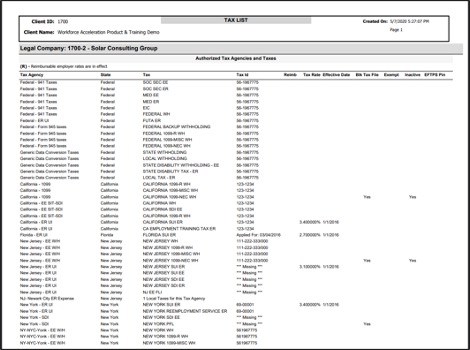
Then, go to Reporting > My Reports and run the Tax List report.
On this report, review the following items:
Federal and state tax ID numbers
State filing frequencies and rates
Here is an example of this report:
Please remember that tax agencies do NOT send any rate or filing frequency notices to Insperity, but they do send this information to you, the employer of record. If you have received these notices or see any discrepancies in your isolved setup, please forward all information to your payroll specialist.
You must have a registered ID number with all appropriate state and federal agencies in order to file. Agencies do not accept “Applied For” ID numbers for filing and payments. Submitting your filings with an “Applied For” ID could cause delay and agency penalties and fees.
Review employee identification information
Go to Employee Management > Employee Summary page and review employee names and social security numbers for accuracy.
Other important tax reminders
Q2 tax filings will be available on the Return Archive page of the Reporting menu in isolved on Aug. 2, 2022.
Pay items that have not been entered in isolved yet OR payroll adjustments that will be reflected on Q2 returns MUST be reported to your payroll specialist by Thursday, June 30. These items include:
In-house checks
Voided checks
Tax adjustments
Third-party sick/disability payments
An additional charge will be applied for any Q2 changes that are submitted after the Thursday, June 30, deadline.
Please contact your dedicated payroll specialist today if you have any questions or concerns regarding the information above.
In accordance with your agreement and Form 8655 (Reporting Agent Authorization), this notification serves as confirmation that your first quarter 2022 payroll tax returns and payments have been filed on your behalf by Insperity® Payroll Services.
First quarter report packages were made available in isolved on May 3, 2022 and include all tax returns that were filed by Insperity. To access your quarterly report packages, log in to isolved and navigate to Return Archive under the Reporting menu.
You can filter the list using the drop-down menus at the top of the screen, as seen below.
Ongoing tax communication
As a reminder, you should send all payroll-related tax communication that you receive to your Insperity payroll specialist for review.
Insperity does not receive direct communication regarding your tax accounts from state and federal agencies, and these notices may contain important pieces of tax information needed for correct and timely tax payments and filings. Incorrect and/or missing information may result in penalties and interest assessed by the tax agency. Insperity is not responsible for any penalties and interest that are charged.
At the end of each quarter, we ask that you review important payroll and tax information in isolved for accuracy.
All Q1 2022 payroll and tax information must be accurate and complete in isolved by Thursday, March 31, 2022 to ensure timely filing. Below are the recommended items to review to help you meet all requirements successfully.
Review tax setup information
It is crucial to confirm that your company and tax setup is correct in isolved. Review each piece of information shown below by going to Reporting > Client Reports to run each report.
Validate the company information below on the Client Profile Report.
Name matches the legal company name registered with tax agencies.
FEIN matches the legal FEIN registered with tax agencies.
Address matches the legal company address registered with tax agencies.
Verify that a Tax Filing contact is listed and that their contact information (name, email address and phone number) is correct and as it should be reflected on tax forms.
Validate your company tax information on the Client Profile Report under the Authorized Tax Agencies and Taxes section.
Review the federal and state tax ID numbers for accuracy.
Review the state filing frequencies and rates to ensure that they are correct.
NOTE: Please remember that tax agencies do NOT send any rate or filing frequency notices to Insperity, but they do send this information to you, the employer of record. If you have received these notices or see any discrepancies in your isolved setup, please forward all information to your payroll specialist.
You must have a registered ID number with all appropriate state and federal agencies in order to file. Agencies do not accept “Applied For” ID numbers for filing and payments. Submitting your filings with an “Applied For” ID could cause delay and agency penalties and fees.
Review employee information on the Employee W2 Verification Report.
Verify employee names and Social Security numbers for accuracy.
Other important tax reminders
First-quarter tax filings will be available on the Return Archive page of the Reporting menu in isolved on May 2, 2022.
Pay items that have not been entered in isolved yet, OR payroll adjustments that will be reflected on Q1 2022 returns, MUST be reported to your payroll specialist by Thursday, March 31. These items include:
In-house checks
Voided checks
Tax adjustments
Third-party sick/disability payments
Ensure all FFCRA qualified sick and leave wages are entered correctly.
An additional charge will be applied for any Q1 2022 corrections submitted after the deadline of Thursday, March 31, 2022.
Please contact your dedicated payroll specialist today if you have any questions or concerns regarding the information above.
In accordance with your agreement and Form 8655 (Reporting Agent Authorization), this notification serves as confirmation that your first quarter 2021 payroll tax returns and payments have been filed on your behalf by Insperity® Payroll Services.
First quarter report packages were made available in isolved® on May 3, 2021 and include all tax returns that were filed by Insperity. To access your quarterly report packages, log in to isolved and navigate to Return Archive under the Reporting menu.
You can filter the list using the drop-down menus at the top of the screen, as seen below.
Ongoing tax communication
As a reminder, you should send all payroll-related tax communication that you receive to your Insperity® payroll specialist for review.
Insperity does not receive direct communication regarding your tax accounts from state and federal agencies, and these notices may contain important pieces of tax information needed for correct and timely tax payments and filings. Incorrect and/or missing information may result in penalties and interest assessed by the tax agency. Insperity is not responsible for any penalties and interest that are charged.