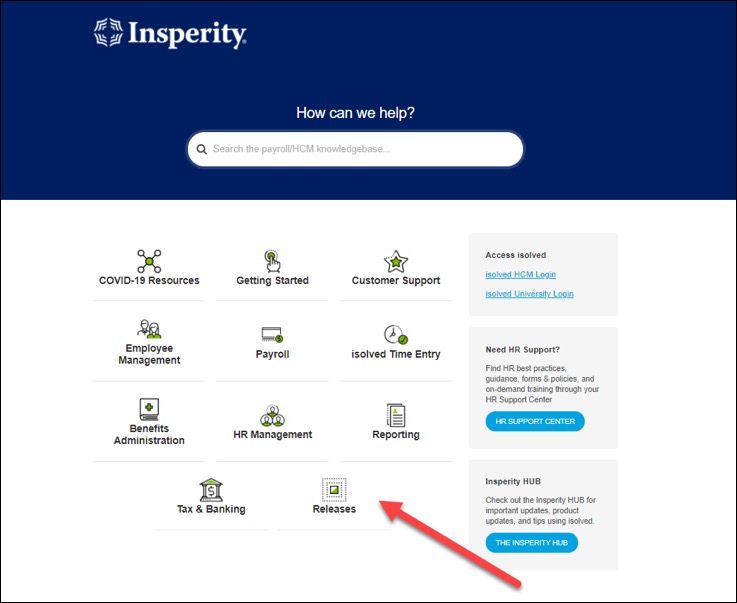
Product release information continues to be posted in the Insperity® Help Center ahead of each release. Stay updated on enhancements being made to isolved and how these updates and changes affect you. You can access release notes in the Releases section of the Help Center.
isolved version 8.06 The hiring process has been redesigned to automate the steps for new employees. A configurable new hire wizard allows you to create workflows that delegate tasks to supervisors, managers, or administrative teams. You can now include tasks like I-9 completion, leave accrual assignment and scheduling performance reviews in your new hire wizard for onboarded employees.
As part of the continued effort to improve the isolved experience, the Employee and Client menus have been revamped to make it easier to find the screens you need.
isolved version 8.07 includes several updates and enhancements to the I-9 screens, as well as added SOC Code requirements. A new feature has been added to enhance usability for labor tracking and new updates for clients using Adaptive Employee Experience.
Product release information continues to be posted in the Insperity® Help Center ahead of each release. Stay updated on enhancements being made to isolved and how these updates and changes affect you. You can access release notes in the Releases section of the Help Center.
isolved version 8.04 brings new functionality to support businesses that pay employees based on miles, days, pieces or other unit types. Dashboards are now easier to read with the improved design in this release, and there is better support for leave plans that accrue each fiscal year.
In release 8.05, releases include updated Time functionality to support spreadsheet view edits and a fix for meal and break allocations as well as an updated time-entry grid guide.
Product release information continues to be posted in the Insperity® Help Center ahead of each release. Stay updated on enhancements being made to isolved and how these updates and changes affect you. You can access release notes in the Releases section of the Help Center.
Here are some highlights from the most recent product release:
Release v8.00: isolved version 8.00 updates minimum wage rates and withholding tax forms to comply with 2022 requirements. The new Certifications dashboard makes it easy to spot employees who need to provide updated documentation. Employees can now receive and sign state wage notices electronically in ESS, beginning with the New York forms in version 8.00. This release includes some new options for legal form addresses and a new overtime calculation for semimonthly and monthly pay frequencies.
The Electronic Consent agreement has been updated to reflect current system requirements for using ESS
You can now provide pay rates notices to New York employees through ESS
The new Certifications dashboard lets you quickly identify employees with expired certifications and easily see who still needs to provide needed documentation by certificate type
In Performance Reviews, you can now assign the Supervisor as the reviewer even if the same person is assigned as the employee’s supervisor and manager
The new Client Notices screen allows you to define New York state pay rate notices for hourly employees
All state and local minimum wages have been updated for 2022. These rates are automatically referenced if you use the minimum wage makeup features for tipped and piece rate employees.
isolved now tracks separate legal, mailing and physical company addresses to support different form and notice requirements
When previewing an employee’s check in Individual Time Entry, you will now see their current federal and state filing statuses
A new pay rate calculation is available for semimonthly and monthly pay frequencies to determine the employee’s weighted average rate for overtime
Release v8.01: isolved version 8.01 includes additional updates to federal and state withholding tax forms to comply with 2022 requirements and support for additional wage notices. New sorting and filtering options makes pay stub reporting for administrators.
Additional form updates have been made in the Tax Wizard to comply with the latest 2022 formats
You can now resend emails that originated as mass emails from the Self-Service Management screen
Additional New York state pay rate notices are available for exempt employees
A wage notice has been added to comply with the California Wage Theft Protection Act of 2011
Product release information continues to be posted in the Insperity Help Center ahead of each release. Stay updated on enhancements being made to isolved and how these updates and changes affect you. You can access release notes in the Releases section of the Help Center.
Here are some highlights from the most recent product release:
isolved version 7.22 was released Dec. 3 and includes new marital status options and an updated pay history view for employees, ACA logic and report updates for benefits and the ability to audit employee life events, and a new regular rate of pay calculation to meet California labor requirements.
New options have been added to the employee marital status to better reflect how employees categorize their relationships.
Employee Self-Service (ESS) Pay History has been updated so paystubs show current federal, state and local tax information and the employee address where they have designated to receive paychecks.
Termination reasons will now display in alphabetical order to make it easier to find the correct one when terminating employees.
Since current EEO standards limit preemployment inquiries about height and weight, that information has been removed from the Confirmation Statement at the end of the Onboarding wizard.
The ACA processing logic was updated to include the 2021 affordability threshold of 9.83%.
The ACA Preview Report has been updated to meet the 2021 form requirements.
Life events have been added to the Employee Change Log so you can audit changes.
COVID-19 sick leave earnings have been updated so they will reflect correctly in Box 14 of the W-2 for 2021.
For California employers, a new regular rate of pay calculation has been added to determine the correct hourly rate for meal and break penalties.
For Puerto Rico employers, the system has been updated to automatically calculate the youth tax exemption beginning in 2022.
A FUTA credit reduction of 3.3% will be applied in the next payroll for employees whose work location is in the U.S. Virgin Islands to capture the additional federal unemployment tax that is due.
isolved version 7.23 was released Dec. 17 and included changes to the Client ACA Management user interface update.
Changes have been made to the menu previously known as Client ACA Management. The name of this menu item changed from Client ACA Management to ACA Client Management for future consistency purposes.
Additional fields for Submission Date, IRS Receipt ID and Acceptance Status have been added and can now be viewed under Client Management > ACA Setup Options > ACA Client Management.
Product release information continues to be posted in the Insperity Help Center ahead of each release. Stay updated on enhancements being made to isolved, and how these updates and changes affect you. You can access release notes in the Releases section of the Help Center.
Here are some highlights from the most recent product release:
isolved version 7.21 was released on Nov. 12. This release continues to enhance ACA processing to simplify the configuration, verification and approval process and give companies more control over affordability calculations. New missing punch notification options have been added for Time users and the Pennsylvania certified payroll report has been updated.
The updated ACA Report Options screen makes it easier to select the right options for accurate 2021 reporting
The ACA Forms Approval screen has been streamlined so you can easily follow the process to review and approve your forms
New notifications are available for missing punch requests
You can now require employees to punch using the isolved GO mobile app with location services enabled so you can capture their geographic location every time
For plans with an annual limit on the amount of time employees can use, they can easily see how much time is left to take when requesting time off and reviewing balances
Pennsylvania state certified payroll reports have been updated to meet PennDOT current standards
Product release information continues to be posted in the Insperity Help Center ahead of each release. Stay updated on enhancements being made to isolved, and how these updates and changes affect you. You can access release notes in the Releases section of the Help Center.
Here are some highlights from the most recent product release:
isolved version 7.16 was released on Sept. 3. It includes a modernized Employee Profile; a new attestation feature for isolved Time that prompts employees to answer questions before they punch to certify their health, waive meals or acknowledge important company information; and new evaluations for benefit administrators. More details are below:
The Employee Summary and EmployeeProfile have been modernized to show key information at a glance while securing protected personal information.
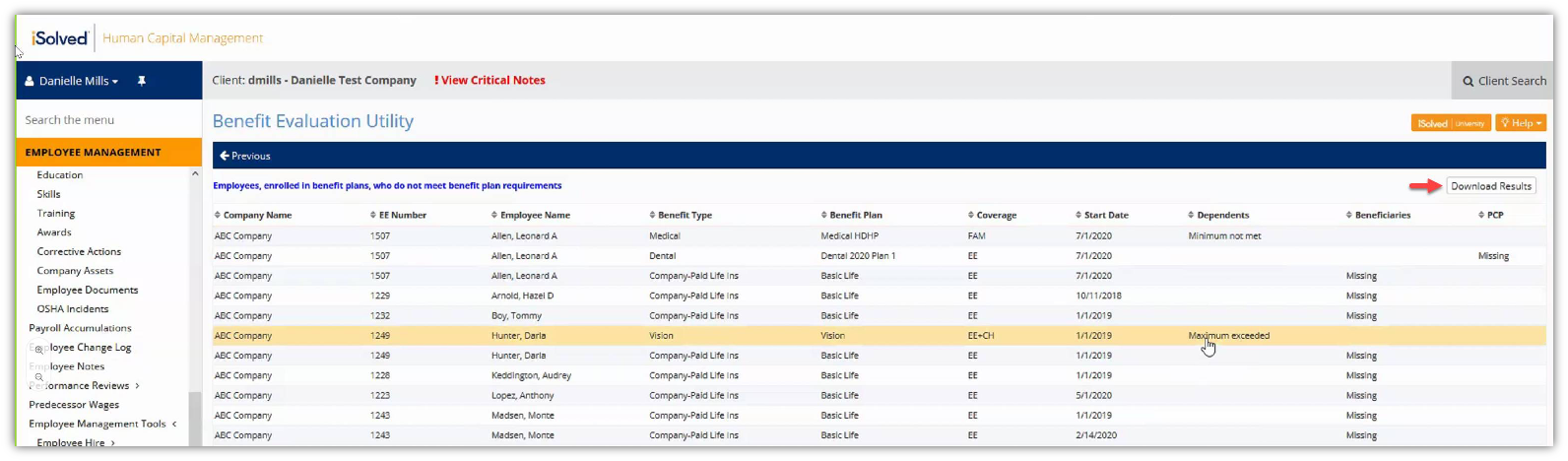
The Benefit Evaluation Utility includes new tools to find employees who still need to enter their HSA bank account information or add missing beneficiary or dependent details.
Employee Profile reports have been updated to include 2020 W-4 tax details.
The new Time Card Notes feature supports California attestation requirements and helps employees return to work safely by prompting employees before they punch. Rounding logic has been updated so individual blocks of time shown on the employee time card sum up to the same cumulative total in payroll.
For enhanced security, isolved will no longer support TLS 1.0 and 1.1 protocols with the isolved version 7.16 release. If you’re using an operating system or browser that is not compliant with TLS 1.2 or higher, you will need to upgrade before you can log in.
isolved version 7.17 was released Sept. 17. This release included an updated Eligibility Rules screen so you can easily identify where the rules are being used. It also included an enhanced paystub that shows employees their current W-4 elections based on the updated 2020 form.
Eligibility Rules have been updated to make it easier to understand which employees are eligible for benefit plans and Time Card Policy Groups.
Clients who have chosen to adopt the new federal filing status fields released in 2020 can now display these fields on paystubs.
Information about the most recent isolved product releases are now available in the Insperity Help Center! To access detailed release notes, go to the Help Center and visit the Releases section.
Here are some highlights from the most recent major product release:
New alerts for isolved Time & Attendance were included in the version 7.8 release.
These enhanced alerts allow designated users to edit the employee’s timecard and add their own alerts, manually add standard alerts or define custom alerts.
The version 7.10 release included enhancements for benefits enrollment and payroll reporting.
Employees will see a modernized look for new hire, life event and open enrollment with new guides available in isolved University to help them with the enhanced online benefits enrollment wizard.
Updates were made to the New Employee and Change Audit report, the ERC reports and the PPP reports.
Isolved release version 7.11 included HR and tax updates.
Email templates can now be customized with formatted text, links and images.
Isolved product release version 7.12 included payroll updates.
Salaries can now be prorated when employees start working, receive a raise in the middle of a pay period, or are terminated.
To access the detailed product release notes for recent major releases, visit the new Insperity Help Center today.
Most development effort has focused on features related to COVID-19 to ensure your second quarter federal tax returns properly reflect new leave earnings, tax credits and deferrals that resulted from the Families First Coronavirus Response Act (FFCRA) and the Coronavirus Aid, Relief and Economic Security (CARES) Act.
Payroll and HR
Enhanced Employee Notes
Several enhancements were made to Employee Notes, including:
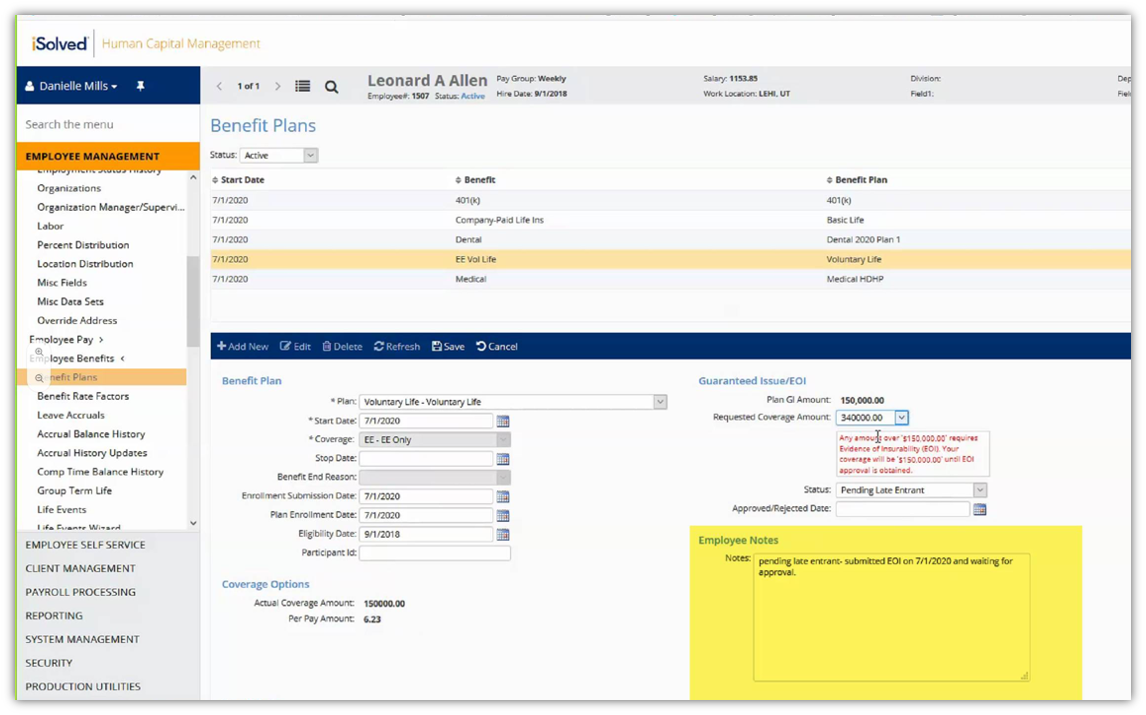
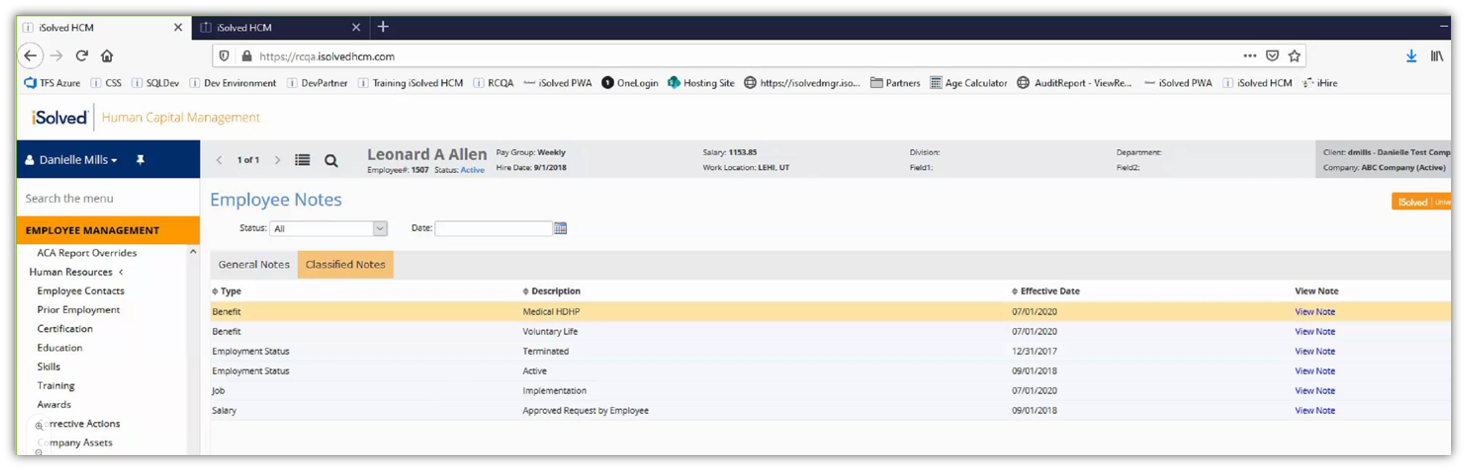
Employee Notes text fields were added to the Benefit Plans, Employment Status History, Salary and Job screens in Employee Management. This allows you to add and record helpful information on those employee screens.
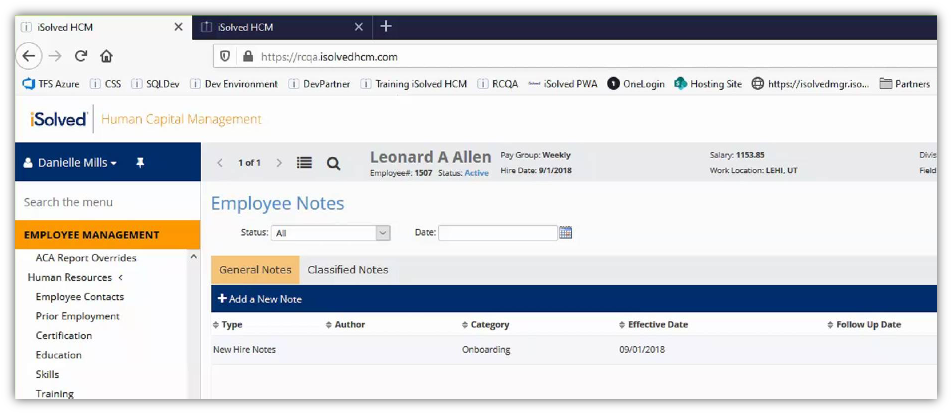
Employee Management > Employee Notes has been updated with two tabs for General Notes and Classified Notes. The General tab replaces the existing Employee Notes screen. You will still be able to access all existing employee notes or add new general notes on this tab. The Classified tab lists the new notes that were entered on the other screens by category.
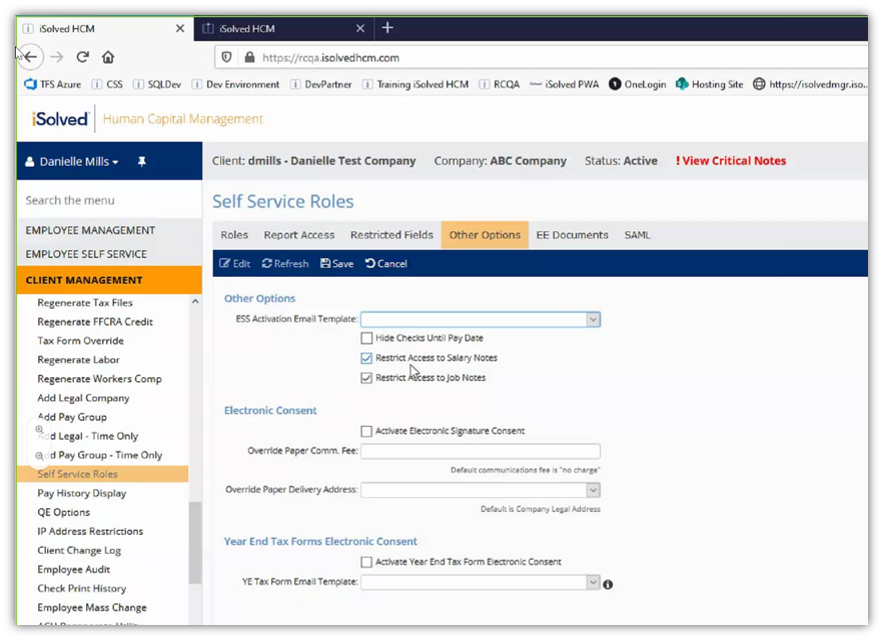
You can restrict access to Employee Notes that are entered on the Job and Salary screens on the Other Options tab in Self Service Roles.
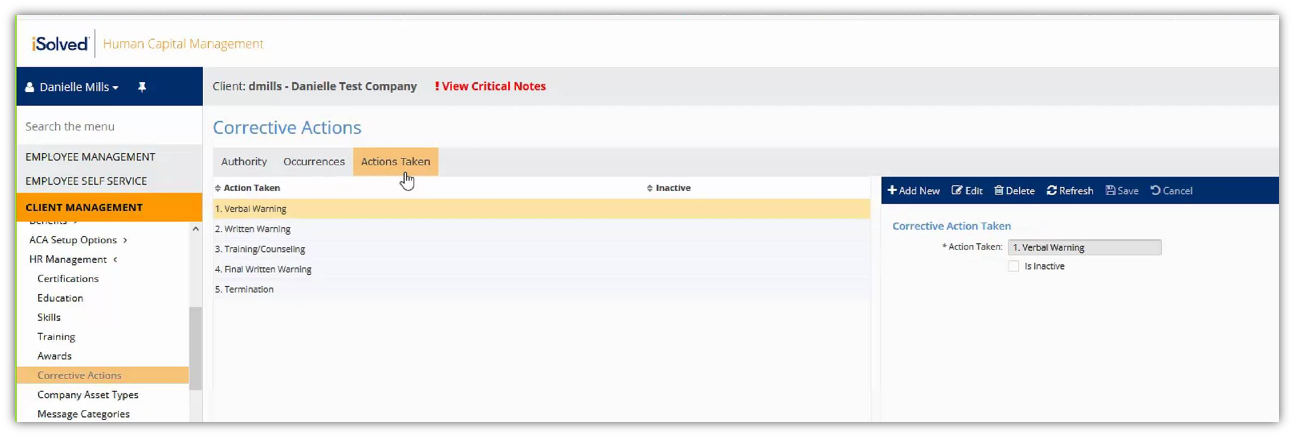
Disciplinary Authorities and Disciplinary Actions are now Corrective Actions
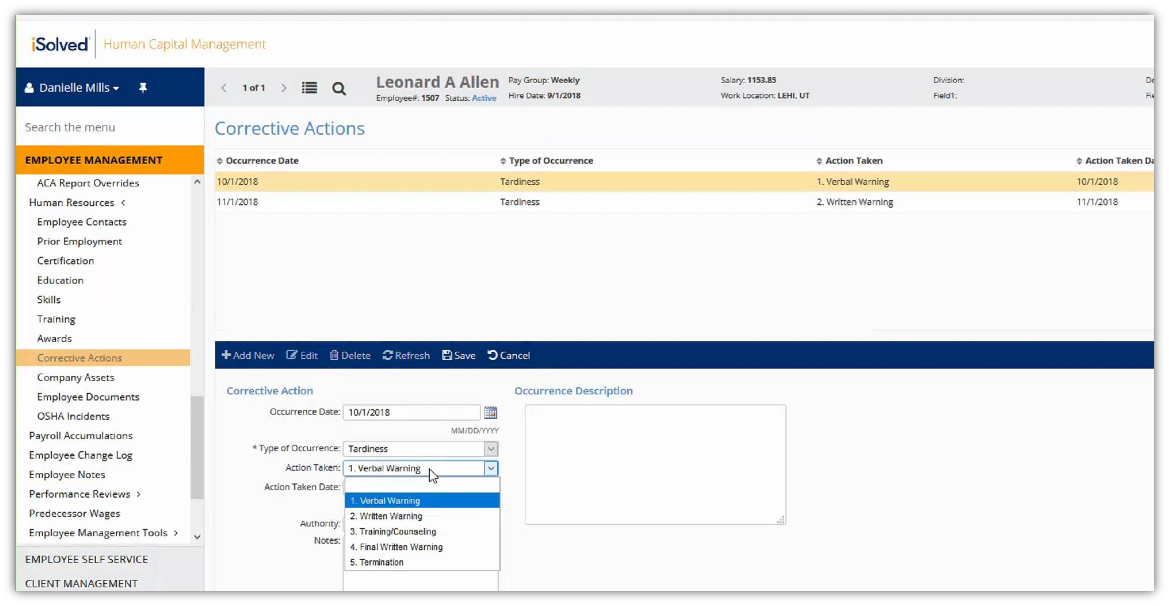
The Disciplinary Authorities and Disciplinary Actions screens have been combined and renamed Corrective Actions. The Corrective Actions screen will now allow you to set up a list of Authorities, Occurrences (previously Offenses) and Actions Taken. Actions Taken that you previously entered as free-form text will be translated into a list of available options that can be selected in the Actions Taken field on the employee’s Corrective Actions screen.
Updated Disability Self-Identification screens
The Department of Labor has released an updated Form CC-305, Voluntary Self-Identification of Disability to replace the version that expired in January. The Disability Self-Identification screens in Onboarding and Employee Self Service have been updated to mirror the form changes.
Compliance update for manual check stubs
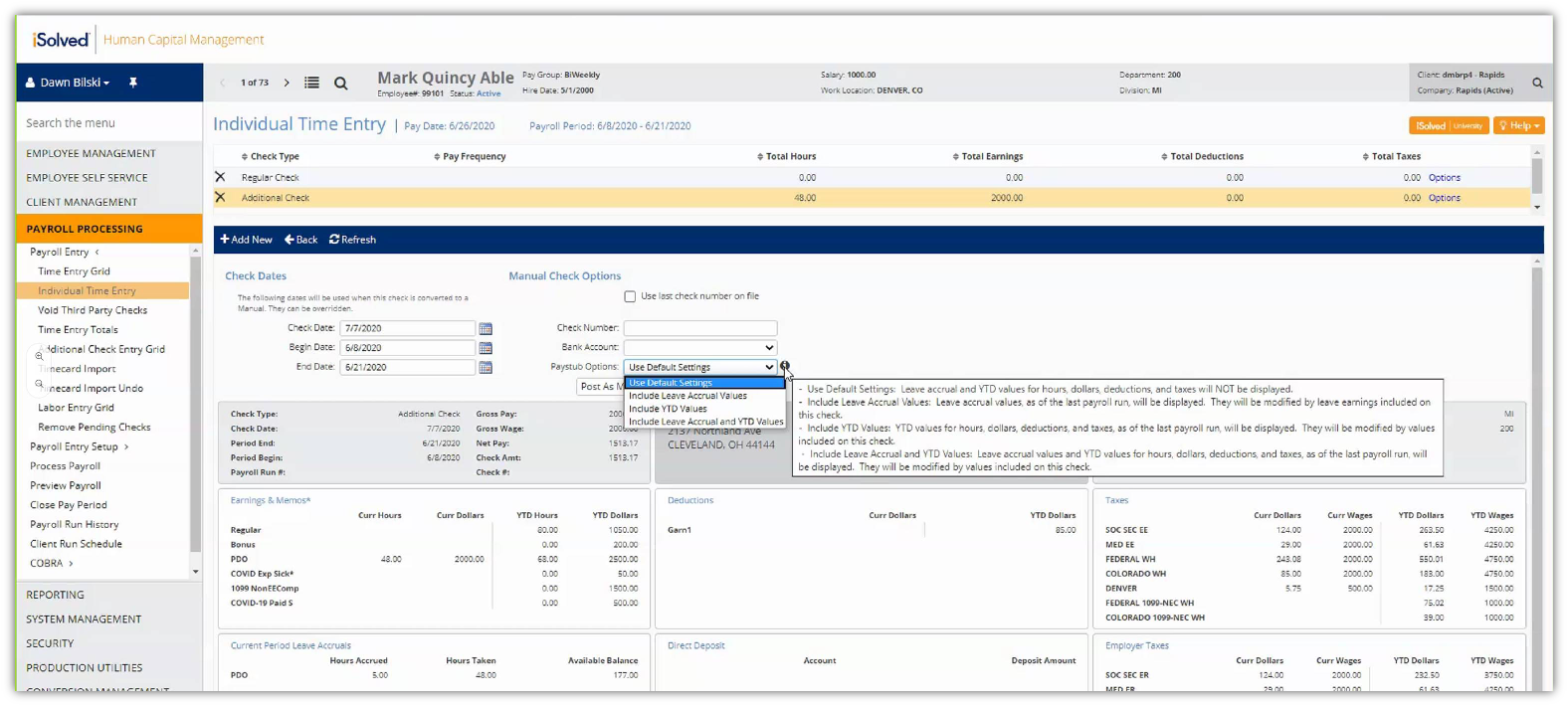
You can now include Leave Accruals and YTD values on printed pay stubs for manual checks. A new Paystub Options list has been added to the Manual Check screen in Individual Time Entry so you can choose to display leave accrual balances, year-to-date totals or both. Hover over the information icon to review the new options.
Notification for account phone number update
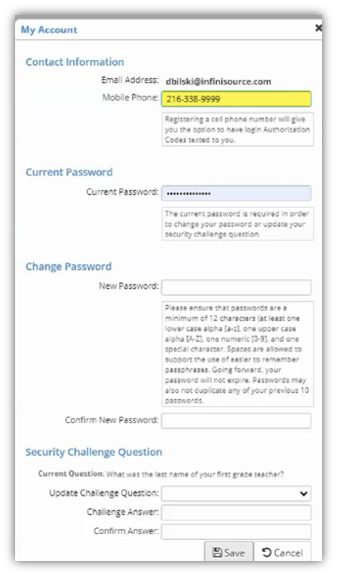
When users update their cell phone number in My Account settings, they will receive a follow-up email verifying the change. This added security measure helps to ensure no one has fraudulently accessed the user account to change login information.
Benefits administration
Update to benefit emails
Enhancements have been made to benefit notification emails, including:
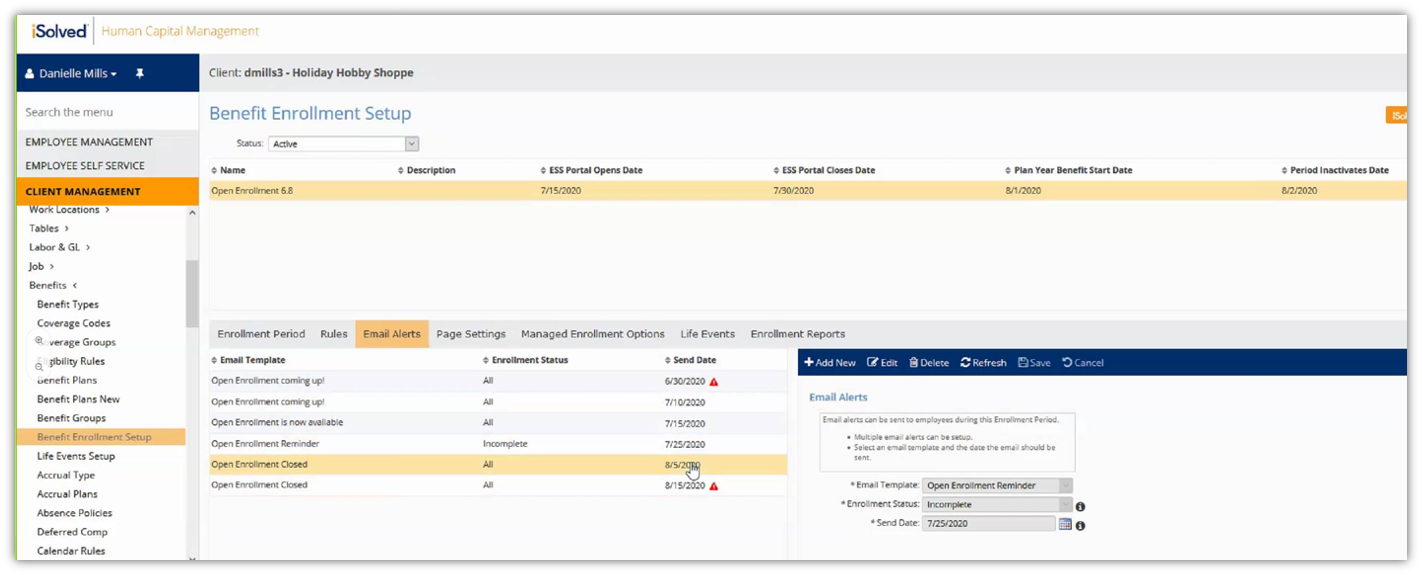
The ability to copy (CC) client users on Life Event emails has been added to the Benefit Enrollment Setup. This means administrators can receive a copy of the automated email notifications when they are sent to employees to remind them to begin or complete open enrollment.
To prevent mistakes, you will now see a warning when email alerts are scheduled more than two weeks before or after the Open Enrollment period. You will see a red triangle next to the email send date if it falls outside of that window.
Enhancements to the Benefit Evaluation Utility
Enhancements were made to the Benefit Evaluation Utility tool, including:
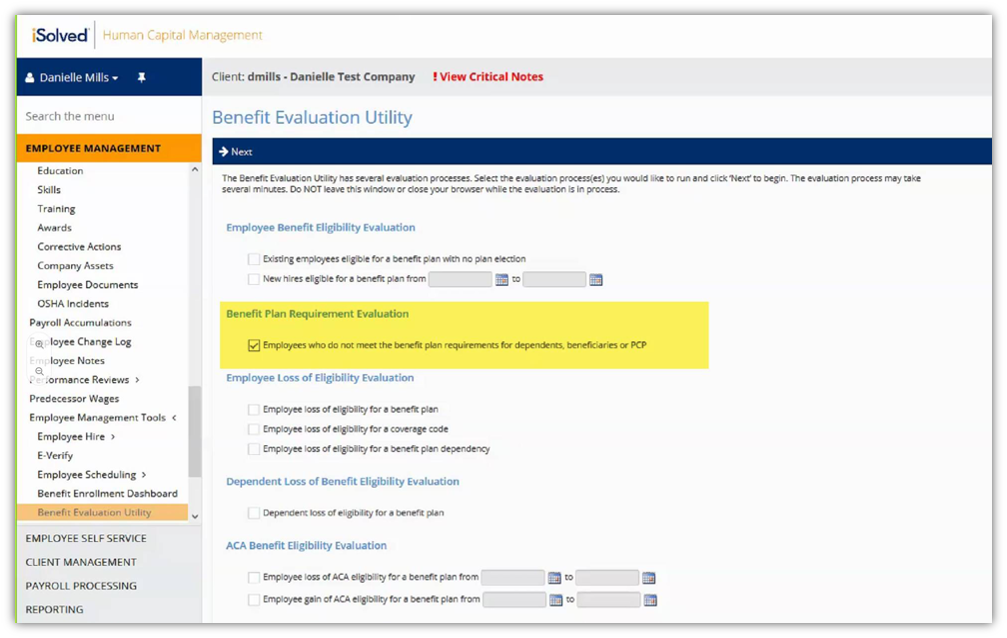
A selection was added to evaluate primary care physicians, beneficiaries and dependents have been entered for all plans that require them. This evaluation supports the new Managed Enrollment option that was added in version 6.7, since employees may need to select new physicians or confirm beneficiaries when their benefit enrollments were automatically carried forward from the prior plan year. This tool will also identify plans that are missing the required number of dependents. This typically occurs when enrollments are automatically carried forward and dependents no longer meet the plan age requirements, so they could not be enrolled in the new plan year.
You can now save the results of the Benefit Evaluation in an Excel spreadsheet using the new Download Results button.